高性能麦克风音量可视化组件:MicVisualizerView 深度解析
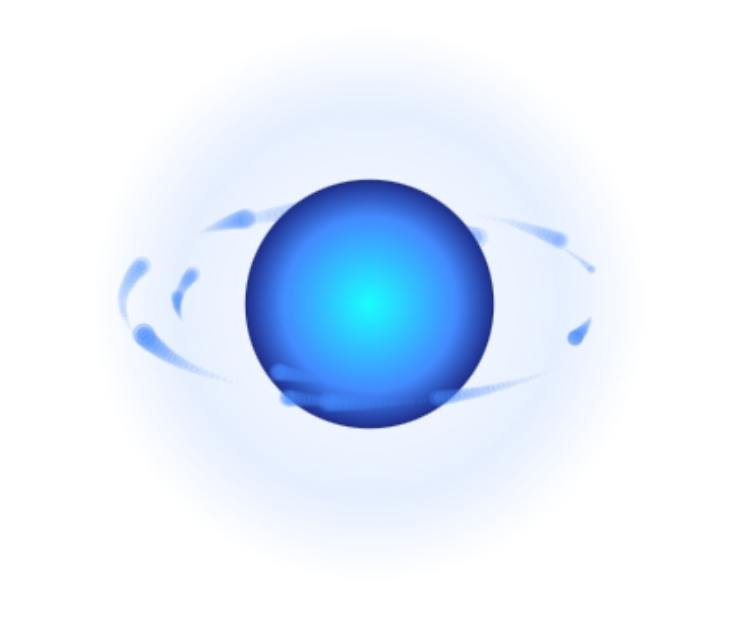
在当今的移动应用开发中,用户界面和用户体验变得越来越重要。为了增强用户的交互体验,特别是在涉及音频处理的应用中,提供直观且美观的视觉反馈成为了一项关键需求。今天,我们将介绍一款高性能的自定义视图组件——MicVisualizerView,它专为展示麦克风音量而设计,并提供了丰富的视觉效果。
动效
核心功能与特点
MicVisualizerView 是一个基于 Android 平台开发的自定义视图,其主要功能是动态显示麦克风输入的 RMS(Root Mean Square)值。该组件不仅支持基本的音量强度显示,还引入了多种视觉反馈效果,包括中心能量球、动态波纹以及粒子拖尾等,使得整个交互过程更加生动有趣。此外,该组件特别注重渲染效率,通过使用 GPU 加速的 Canvas 渐变渲染技术及优化动画调度策略,确保了即使在低端设备上也能流畅运行。
- 多层视觉反馈:结合中心能量球、动态波纹和粒子拖尾等多种元素,创造出引人注目的视觉效果。
- 呼吸节奏效果:在静音状态下,组件会缓慢闪烁,模拟出一种类似“呼吸”的效果,增加了界面的活力。
- 平滑响应机制:采用指数平均滤波算法对音量变化进行平滑处理,避免了因快速波动导致的视觉抖动现象。
技术实现细节
从技术角度看,MicVisualizerView 的设计充分考虑了性能优化。例如,所有动画效果均基于数学函数计算,无需依赖 Bitmap 缓存,这大大减轻了内存负担。同时,通过精确控制动画帧率(约 60fps),确保了视觉效果的流畅性。此外,该组件还采用了 RadialGradient 来生成渐变色彩,以增强视觉层次感。
动态波纹效果
波纹效果是 MicVisualizerView 的一大亮点。每当检测到声音输入时,都会根据当前音量水平生成相应规模的波纹,并随着时间逐渐扩散直至消失。这一过程中,开发者巧妙地运用了时间差分法,根据不同场景调整波纹的出现频率,从而实现了动静结合的效果。
粒子系统
为了增加视觉复杂度,MicVisualizerView 还集成了一套简单的粒子系统。这些粒子围绕中心能量球运动,其亮度和速度随音量大小变化而变化。粒子的拖尾轨迹由透明度递减的点组成,形成一条条优雅的光带,进一步丰富了视觉表现力。
结语
总之,MicVisualizerView 作为一个高性能的麦克风音量可视化组件,凭借其独特的设计理念和技术实现,在提升用户体验方面展现了巨大潜力。无论是用于语音识别应用还是在线会议软件,都能为用户提供更加直观、愉悦的操作感受。对于希望在其产品中加入此类功能的开发者来说,无疑是一个值得借鉴的好例子。
package com.zy.view;

import android.content.Context;
import android.graphics.*;
import android.util.AttributeSet;
import android.view.View;
import androidx.annotation.Nullable;
import java.util.LinkedList;
import java.util.Random;

/**
 *
 * 【核心功能】
 * - 动态显示麦克风音量 RMS(Root Mean Square)
 * - 支持多层视觉反馈效果:中心能量球 + 动态波纹 + 粒子拖尾
 * - 带有呼吸节奏效果(静音时缓慢呼吸闪烁)
 * - 自适应音量强度变化,平滑响应,防止抖动
 *
 * 【渲染优化】
 * - 使用 GPU 加速的 Canvas 渐变渲染
 * - 动画以 60fps 调度(postDelayed 16ms)
 * - 所有效果基于数学函数计算,无需 Bitmap 缓存
 */
public class MicVisualizerView extends View {

    // ======================== 基础绘图工具 ========================
    private final Paint circlePaint = new Paint(Paint.ANTI_ALIAS_FLAG);   // 绘制圆形/渐变的画笔
    private final Paint particlePaint = new Paint(Paint.ANTI_ALIAS_FLAG); // 绘制粒子的画笔

    // ======================== 音量控制参数 ========================
    private float displayRms = 0f;  // 当前显示的 RMS(经过平滑)
    private float targetRms = 0f;   // 实际输入的 RMS 值
    private float maxRms = 2000f;   // 音量归一化最大值
    private static final float MIN_RMS = 50f; // 最小有效 RMS 阈值(低于视为静音)

    // ======================== 波纹动画参数 ========================
    private static final long RIPPLE_DURATION_MS = 1500L;     // 每个波纹持续时间
    private static final float RIPPLE_START_SCALE = 0.35f;     // 波纹初始比例
    private static final float RIPPLE_END_SCALE = 1.6f;        // 波纹最大比例
    private static final long IDLE_RIPPLE_INTERVAL_MS = 1400L; // 静音时波纹间隔
    private static final long ACTIVE_RIPPLE_MIN_INTERVAL_MS = 280L; // 有声音时波纹频率更快

    private long lastRippleSpawnMs = 0L; // 上一次波纹生成时间
    private final LinkedList<Ripple> ripples = new LinkedList<>(); // 当前正在播放的波纹集合

    /** 波纹实体类(记录生成时间) */
    private static class Ripple {
        final long startTimeMs;
        Ripple(long t) { this.startTimeMs = t; }
    }

    // ======================== 呼吸动画状态 ========================
    private boolean isBreathing = true; // 是否处于“呼吸”状态(静音后触发)
    private long lastSoundTimeMs = 0L;  // 最近一次检测到声音的时间戳
    private static final long SOUND_TIMEOUT_MS = 1000L;  // 声音超时时间(超过此值进入呼吸状态)
    private static final long BREATH_INTERVAL_MS = 2000L; // 呼吸节奏周期(毫秒)

    // ======================== 粒子系统参数 ========================
    private static final int PARTICLE_COUNT = 14;  // 粒子数量
    private final Random random = new Random();    // 随机数生成器
    private final Particle[] particles = new Particle[PARTICLE_COUNT]; // 粒子数组

    /** 粒子对象(带拖尾路径) */
    private static class Particle {
        float angle, speed, distance, size, brightness; // 粒子运动和亮度参数
        boolean active;  // 是否启用
        final float[] trailX, trailY, trailAlpha; // 拖尾轨迹(坐标 + 透明度)
        final int trailLength; // 拖尾长度
        int head = 0;    // 当前写入索引
        boolean full = false; // 是否填满轨迹缓冲

        private static final int MIN_TRAIL = 12, MAX_TRAIL = 24; // 拖尾范围

        Particle(Random rand) {
            this.trailLength = MIN_TRAIL + rand.nextInt(MAX_TRAIL - MIN_TRAIL + 1);
            this.trailX = new float[trailLength];
            this.trailY = new float[trailLength];
            this.trailAlpha = new float[trailLength];
        }

        /** 更新拖尾轨迹并逐渐衰减透明度 */
        void updateTrail(float x, float y, float brightness) {
            trailX[head] = x;
            trailY[head] = y;
            trailAlpha[head] = brightness;
            head = (head + 1) % trailLength;
            full |= (head == 0);
            int size = full ? trailLength : head;
            int start = full ? head : 0;
            for (int i = 1; i < size; i++) {
                int idx = (start + i) % trailLength;
                trailAlpha[idx] *= 0.94f; // 逐步衰减透明度
            }
        }

        int size() { return full ? trailLength : head; }
        int startIndex() { return full ? head : 0; }
    }

    // ======================== 颜色定义 ========================
    private static final int COLOR_CORE = Color.parseColor("#448AFF");     // 核心蓝
    private static final int COLOR_EDGE = Color.parseColor("#448AFF");     // 外缘蓝
    private static final int COLOR_DEEP_BLUE = Color.parseColor("#1A237E");// 深蓝背景

    // ======================== 中心渐变缓存 ========================
    private RadialGradient centerGradient; // 缓存中心球体渐变
    private float gradientRadius = -1f;    // 当前渐变半径,用于判断是否需重建

    // ======================== 动画刷新任务(约60fps) ========================
    private final Runnable updateRunnable = new Runnable() {
        @Override
        public void run() {
            updateState();     // 更新物理状态
            invalidate();      // 请求重绘
            postDelayed(this, 16); // 每16ms刷新一次(约60帧)
        }
    };

    // ======================== 构造函数 ========================
    public MicVisualizerView(Context context) {
        super(context);
        init();
    }

    public MicVisualizerView(Context context, @Nullable AttributeSet attrs) {
        super(context, attrs);
        init();
    }

    /** 初始化绘制参数与粒子系统 */
    private void init() {
        circlePaint.setStyle(Paint.Style.FILL);
        particlePaint.setStyle(Paint.Style.FILL);

        // 初始化粒子系统
        for (int i = 0; i < PARTICLE_COUNT; i++) {
            particles[i] = new Particle(random);
            resetParticle(particles[i]);
        }

        // 启动动画更新循环
        post(updateRunnable);
    }

    /** 重置粒子属性,随机初始角度与距离 */
    private void resetParticle(Particle p) {
        p.angle = random.nextFloat() * (float) (Math.PI * 2);
        p.speed = 0.015f + random.nextFloat() * 0.03f;
        p.distance = 100f + random.nextFloat() * 70f;
        p.size = 1.5f + random.nextFloat() * 2.0f;
        p.brightness = 0.35f + random.nextFloat() * 0.65f;
        p.active = true;
        p.full = false;
        p.head = 0;
    }

    // ======================== 音量输入接口 ========================
    /** 外部调用:传入实时 RMS 值 */
    public void setRmsLevel(float rms) { targetRms = rms; }

    /** 可选:设置最大 RMS 上限 */
    public void setMaxRms(float maxRms) { this.maxRms = maxRms; }

    // ======================== 状态更新逻辑 ========================
    private void updateState() {
        long now = System.currentTimeMillis();

        // --- 平滑 RMS 变化(指数平均滤波) ---
        float clamped = Math.max(0f, Math.min(targetRms, maxRms));
        displayRms = displayRms * 0.85f + clamped * 0.15f;

        float normalized = maxRms > 0 ? displayRms / maxRms : 0f;

        // 记录最近一次有声音的时间
        if (clamped > MIN_RMS) lastSoundTimeMs = now;
        isBreathing = (now - lastSoundTimeMs) > SOUND_TIMEOUT_MS;

        // --- 波纹生成逻辑 ---
        boolean active = normalized > 0.10f;
        long interval = active ? ACTIVE_RIPPLE_MIN_INTERVAL_MS : IDLE_RIPPLE_INTERVAL_MS;
        if (now - lastRippleSpawnMs >= interval) spawnRipple(now);

        // 移除过期波纹
        while (!ripples.isEmpty() && now - ripples.peekFirst().startTimeMs > RIPPLE_DURATION_MS) {
            ripples.removeFirst();
        }

        // --- 更新粒子 ---
        float speedFactor = isBreathing ? 0.5f : (0.8f + normalized * 2.0f);
        float baseBrightness = 0.4f + normalized * 0.6f;

        for (Particle p : particles) {
            if (!p.active) continue;
            p.angle = (p.angle + p.speed * speedFactor) % ((float) (Math.PI * 2.0));
            p.distance = clamp(p.distance + (random.nextFloat() - 0.5f) * 0.6f, 50f, 140f);
            float depth = Math.sin(p.angle) >= 0 ? 1.0f : 0.6f;
            p.brightness = clamp(baseBrightness * depth * (0.8f + 0.2f * random.nextFloat()), 0.15f, 1f);
        }
    }

    /** 新建一个波纹对象 */
    private void spawnRipple(long now) {
        ripples.add(new Ripple(now));
        lastRippleSpawnMs = now;
        if (ripples.size() > 4) ripples.removeFirst(); // 限制最多同时显示4个波纹
    }

    // ======================== 绘制逻辑 ========================
    @Override
    protected void onDraw(Canvas canvas) {
        super.onDraw(canvas);

        int w = getWidth(), h = getHeight();
        int cx = w / 2, cy = h / 2; // 中心点

        float minDim = Math.min(w, h);
        float normalized = Math.min(displayRms / maxRms, 1f);
        float baseRadius = minDim * 0.16f; // 基础半径

        // 呼吸节奏:通过sin函数控制半径轻微波动
        float breathPhase = (float) ((System.currentTimeMillis() % BREATH_INTERVAL_MS) /
                (double) BREATH_INTERVAL_MS * 2 * Math.PI);
        float breathing = isBreathing ? (0.02f * (float) Math.sin(breathPhase)) : 0f;
        float centerScale = 0.4f * normalized + 0.06f + breathing;
        float sphereRadius = baseRadius * (1.0f + centerScale);

        // --- 绘制顺序 ---
        drawParticles(canvas, cx, cy, false);  // 背面粒子
        drawCenterSphere(canvas, cx, cy, sphereRadius); // 中心能量球
        drawParticles(canvas, cx, cy, true);   // 前景粒子
        drawRipples(canvas, cx, cy, normalized, baseRadius, minDim); // 动态波纹
    }

    /** 分层绘制粒子 */
    private void drawParticles(Canvas canvas, int cx, int cy, boolean frontHalf) {
        for (Particle p : particles) {
            if (!p.active) continue;
            boolean front = (p.angle % (Math.PI * 2)) < Math.PI;
            if (front == frontHalf) drawParticle(canvas, p, cx, cy);
        }
    }

    /** 绘制单个粒子及其拖尾 */
    private void drawParticle(Canvas canvas, Particle p, float cx, float cy) {
        float x = cx + (float) Math.cos(p.angle) * p.distance;
        float y = cy + (float) Math.sin(p.angle) * p.distance * 0.4f;

        // 更新拖尾轨迹
        p.updateTrail(x, y, p.brightness);
        int start = p.startIndex(), count = p.size();

        // 绘制拖尾点(由旧到新,透明度递减)
        for (int k = 0; k < count; k++) {
            int idx = (start + k) % p.trailLength;
            float alphaF = clamp(p.trailAlpha[idx], 0f, 1f);
            particlePaint.setColor(Color.argb((int) (alphaF * 255), 68, 138, 255));
            float size = p.size * (0.3f + k * 0.15f) * 0.7f;
            canvas.drawCircle(p.trailX[idx], p.trailY[idx], size, particlePaint);
        }

        // 绘制粒子主体(最亮点)
        particlePaint.setColor(COLOR_CORE);
        particlePaint.setAlpha((int) (p.brightness * 255));
        canvas.drawCircle(x, y, p.size * 1.3f, particlePaint);
    }

    /** 绘制中心发光球体 */
    private void drawCenterSphere(Canvas canvas, float cx, float cy, float radius) {
        // 仅当半径变化显著时重新生成渐变(性能优化)
        if (centerGradient == null || Math.abs(gradientRadius - radius) > 0.5f) {
            centerGradient = new RadialGradient(
                    cx, cy, radius,
                    new int[]{
                            Color.argb(230, 0, 255, 255), // 中心亮青色
                            COLOR_EDGE,                    // 渐变蓝边
                            COLOR_DEEP_BLUE                // 外层深蓝
                    },
                    new float[]{0f, 0.7f, 1f},
                    Shader.TileMode.CLAMP
            );
            gradientRadius = radius;
        }

        circlePaint.setShader(centerGradient);
        canvas.drawCircle(cx, cy, radius, circlePaint);
    }

    /** 绘制扩散波纹 */
    private void drawRipples(Canvas canvas, int cx, int cy, float normalized, float baseRadius, float minDim) {
        float maxRadius = minDim * 0.50f;
        int waveColor = blendColor(COLOR_EDGE, Color.WHITE, normalized * 0.7f);

        for (Ripple r : ripples) {
            float t = clamp((System.currentTimeMillis() - r.startTimeMs) /
                    (float) RIPPLE_DURATION_MS, 0f, 1f);
            float scale = RIPPLE_START_SCALE + t * (RIPPLE_END_SCALE - RIPPLE_START_SCALE);
            float radius = baseRadius * (1f + scale) + normalized * maxRadius * 0.15f;
            int alpha = (int) (180 * (1f - t));

            RadialGradient gradient = new RadialGradient(
                    cx, cy, radius,
                    new int[]{Color.TRANSPARENT,
                            Color.argb(alpha, Color.red(waveColor),
                                    Color.green(waveColor), Color.blue(waveColor)),
                            Color.TRANSPARENT},
                    new float[]{0f, 0.7f, 1f},
                    Shader.TileMode.CLAMP
            );
            circlePaint.setShader(gradient);
            canvas.drawCircle(cx, cy, radius, circlePaint);
        }
    }

    // ======================== 工具函数 ========================
    /** 限制数值范围 */
    private float clamp(float v, float min, float max) {
        return Math.max(min, Math.min(max, v));
    }

    /** 颜色混合(线性插值) */
    private int blendColor(int c1, int c2, float ratio) {
        ratio = clamp(ratio, 0f, 1f);
        return Color.argb(
                (int) (Color.alpha(c1) + (Color.alpha(c2) - Color.alpha(c1)) * ratio),
                (int) (Color.red(c1) + (Color.red(c2) - Color.red(c1)) * ratio),
                (int) (Color.green(c1) + (Color.green(c2) - Color.green(c1)) * ratio),
                (int) (Color.blue(c1) + (Color.blue(c2) - Color.blue(c1)) * ratio)
        );
    }
}

网易智企-云信开发者社区是面向全网开发者的技术交流与服务平台,依托近 29 年 IM、音视频技术积累,提供 IM、RTC、实时对话智能体、云原生、短信等全场景开发资源。
更多推荐



 5
5 0
0- 0


 已为社区贡献1条内容

所有评论(0)