Flutter实战一Flutter聊天应用(八)
现在,我们将使用Firebase服务将聊天消息数据存储并同步到公用共享实时数据库上的云。我们需要使用firebase_database插件,用于在Firebase数据库存储和同步消息,还需要使用firebase_animated_list插件,用于增强聊天消息列表。在main.dart文件中,确保导入相应的包。import 'package:firebase_database/firebase_d
现在,我们将使用Firebase服务将聊天消息数据存储并同步到公用共享实时数据库上的云。我们需要使用firebase_database插件,用于在Firebase数据库存储和同步消息,还需要使用firebase_animated_list插件,用于增强聊天消息列表。在main.dart文件中,确保导入相应的包。
import 'package:firebase_database/firebase_database.dart';
import 'package:firebase_database/ui/firebase_animated_list.dart';在Firebase控制台中,更改Firebase实时数据库的安全规则,选择“Database > 规则”,规则如下所示。
{
  "rules": {
    "messages": {
      ".read": true,
      ".write": "auth != null && auth.provider == 'google'"
    }
  }
}
上述规则允许公开的只读访问来自数据库的消息,以及用于将消息写入数据库的Google身份验证。此时,用户需要在发送消息之前登录,并且可以在不登录的情况下查看消息。
要加载用于显示的聊天消息并提交用户输入的消息,必须与Firebase实时数据库建立连接。首先,在我们的ChatScreenState控件中,定义一个名为reference的DatabaseReference成员变量。初始化此变量以获取对Firebase数据库中消息路径的引用。
class ChatScreenState extends State<ChatScreen> with TickerProviderStateMixin {
  //...
  final reference = FirebaseDatabase.instance.reference().child('messages');
  //...
}应用程序现在可以使用此引用来读取和写入数据库中的特定位置,我们需要修改ChatScreenState类中的_sendMessage()方法以向数据库添加新的聊天消息。在应用程序中消息存储为文本值数组,我们使用一个数据库,每个消息都需要被定义为一个带有字段的行。
class ChatScreenState extends State<ChatScreen> with TickerProviderStateMixin {
  //...
  void _sendMessage({ String text }) {
    reference.push().set({
      'text': text,
      'senderName': googleSignIn.currentUser.displayName,
      'senderPhotoUrl': googleSignIn.currentUser.photoUrl,
    });
    analytics.logEvent(name: 'send_message');
  }
  //...
}
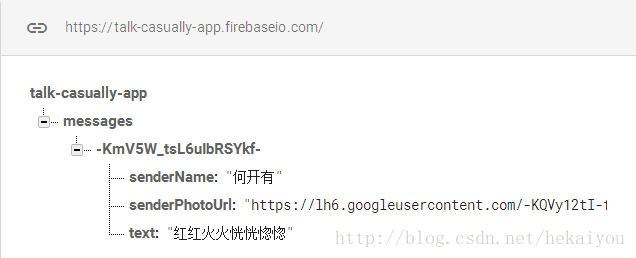
要为每个聊天消息编写一个新行,需要调用由Firebase Database API定义的push()和set()方法。访问此API由Flutter Firebase Database插件提供,该插件是我们之前导入的。push()方法创建一个新的空数据库行,set()方法可以使用消息的属性(text、senderName、senderPhotoUrl)填充它。
当发送或接收消息时,项目早期版本的动画是从列表底部垂直滑动。UI的代码采用常规的以应用为中心的动画方法,AnimationController和TickerProvider对象管理ListView控件中的聊天消息列表。
现在我们将使用一个专门的AnimatedList控件实现相同的效果,该方法可以让我们将应用程序与FirebaseDatabaseUI库集成。它使我们能够在Flutter应用程序中执行与iOS上的UITableView或Android上的RecyclerView绑定的相同效果。它也简化了我们的代码,只需要一个animation属性来动画化该消息。
首先将ChatScreenState类中的ListView控件替换为新的FirebaseAnimatedList控件。
class ChatScreenState extends State<ChatScreen> with TickerProviderStateMixin {
  //...
  Widget build(BuildContext context) {
    return new Scaffold(
      //...
      body: new Column(children: <Widget>[
        new Flexible(
          child: new FirebaseAnimatedList(
            query: reference,
            sort: (a, b) => b.key.compareTo(a.key),
            padding: new EdgeInsets.all(8.0),
            reverse: true,
            itemBuilder: (_, DataSnapshot snapshot, Animation<double> animation) {
              return new ChatMessage(
                snapshot: snapshot,
                animation: animation
              );
            }
          )
        ),
        new Divider(height: 1.0),
        new Container(
          decoration: new BoxDecoration(
            color: Theme.of(context).cardColor,
          ),
          child: _buildTextComposer(),
        )
      ],),
    );
  }
  //...
}FirebaseAnimatedList是由Flutter Firebase Database插件提供的自定义控件。关联的类是AnimatedList类的包装器,增强了它与Firebase数据库的交互。
FirebaseAnimatedList的query参数指定应该出现在列表中的数据库查询。在这种情况下,我们将传递数据库引用reference,该引用扩展了Query类。reverse参数将列表的开头定义为屏幕的底部,靠近文本输入。sort参数指定显示消息的顺序。要在列表开头(屏幕底部)到达时显示消息,需要传递一个比较传入消息时间戳key的功能。
对于itemBuilder属性,将第二个参数从int index(正在构建的行的位置)更改为名为snapshot的DataSnapshot对象。顾名思义,snapshot表示数据库中行的(只读)内容。FirebaseAnimatedList将使用此构建器在滚动到视图中时按需填充列表行。
最后,在ChatScreenState的build()方法返回的ChatMessage控件中,将text属性更改为snapshot。Flutter Firebase Database插件将snapshot定义为只有一个key及其value。
到现在,我们的应用程序一直在管理自己的ChatMessage控件列表,并使用它来填充ListView。现在我们将使用一个FirebaseAnimatedList,它管理动画控制器,并自动使用Firebase数据库查询的结果填充列表。我们将使用FirebaseAnimatedList传递到应用程序的Animation对象来更改ChatMessage控件来构建其CurvedAnimation。
在ChatMessage类的默认构造函数中,将AnimationController更改为Animation对象。
class ChatMessage extends StatelessWidget {
  ChatMessage({this.snapshot, this.animation});
  final DataSnapshot snapshot;
  final Animation animation;
  //...
}同时,让我们将消息内容的字段从文本字符串更新为DataSnapshot。使用AnimatedList语法意味着从应用程序修改和删除几行代码,修改CurvedAnimation对象以使用新的animation字段,而不是将animationController作为其父项。
class ChatMessage extends StatelessWidget {
  //...
  Widget build(BuildContext context) {
    return new SizeTransition(
      sizeFactor: new CurvedAnimation(
        parent: animation,
        curve: Curves.easeOut
      ),
      //...
    );
  }
  //...
}从ChatScreenState类定义中删除TickerProviderStateMixin控件和List变量。
class ChatScreenState extends State<ChatScreen> {
  final TextEditingController _textController = new TextEditingController();
  final reference = FirebaseDatabase.instance.reference().child('messages');
  bool _isComposing = false;
  //...
}还要删除不再需要的dispose()方法。
class ChatScreenState extends State<ChatScreen> {
  //...
//  @override
//  void dispose() {
//    for(ChatMessage message in _messages)
//      message.animationController.dispose();
//    super.dispose();
//  }
  //...
}
现在,我们可以调整使用用户配置文件信息的UI控件。以下控件需要从Firebase Database API获取以下信息:
GoogleUserCircleAvatarText控件(发送人的姓名)Text控件(消息内容)
而不是从GoogleSignIn实例获取此信息,我们将修改控件以从DataSnapshot对象的value字段获取此信息。
class ChatMessage extends StatelessWidget {
  //...
  Widget build(BuildContext context) {
    return new SizeTransition(
      //...
      child: new Container(
        margin: const EdgeInsets.symmetric(vertical: 10.0),
        child: new Row(
          crossAxisAlignment: CrossAxisAlignment.start,
          children: <Widget>[
            new Container(
              margin: const EdgeInsets.only(right: 16.0),
              child: new GoogleUserCircleAvatar(snapshot.value['senderPhotoUrl']),
            ),
            new Column(
              crossAxisAlignment: CrossAxisAlignment.start,
              children: <Widget>[
                new Text(
                  snapshot.value['senderName'],
                  style: Theme.of(context).textTheme.subhead),
                new Container(
                  margin: const EdgeInsets.only(top: 5.0),
                  child: new Text( snapshot.value['text'] ),
                )
              ]
            )
          ]
        )
      )
    );
  }
  //...
}
由于初始化状态对象需要重新启动应用程序,因此我们需要重新加载应用程序。
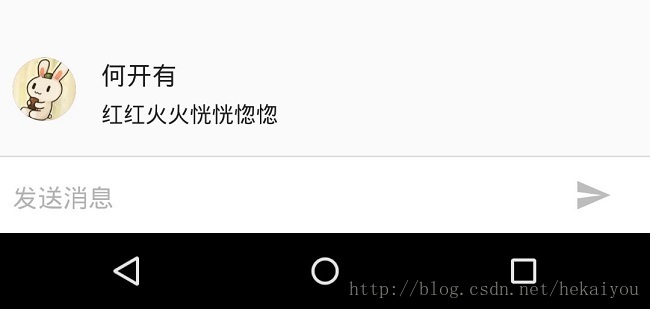
只使用单个设备,我们可以在Firebase控制台中的数据库下查看消息:
如果我们有两台设备连接到开发机器,那么我们则可以通过Firebase数据库发送消息并将其看到另一台设备的消息。

网易智企-云信开发者社区是面向全网开发者的技术交流与服务平台,依托近 29 年 IM、音视频技术积累,提供 IM、RTC、实时对话智能体、云原生、短信等全场景开发资源。
更多推荐


 1
1 0
0- 0


 已为社区贡献20条内容

所有评论(0)