【探花交友DAY 08】左滑不喜欢右滑喜欢以及附近的人
实现模拟探探的左右滑动功能和附近的人功能
1. 探花功能
1.1 功能分析
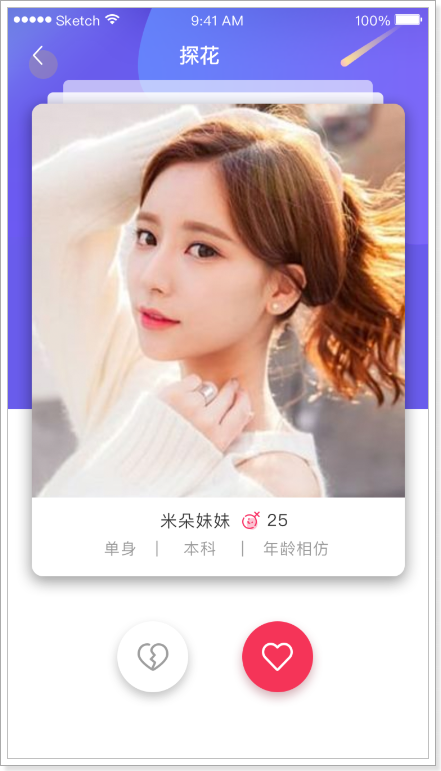
探花功能是将推荐的好友随机的通过卡片的形式展现出来,用户可以选择左滑、右滑操作,左滑:“不喜欢”,右滑:“喜欢”。功能和现在市面上比较流行的探探是一样的。
喜欢:如果双方喜欢,那么就会成为好友。前端的界面如下图所示
由于好友数据变化比较快且更新的频率很高,所以我们采用MongoDB对数据进行存储,涉及到的表如下:
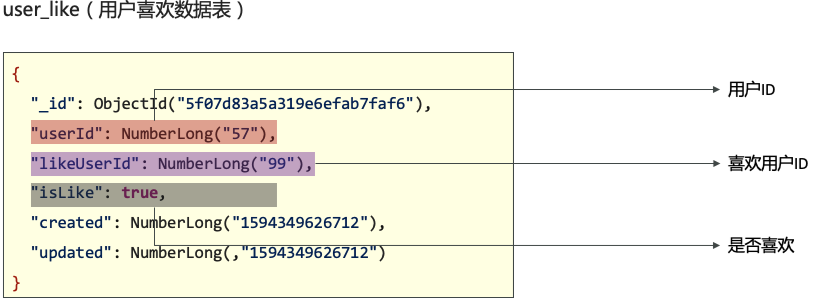
用户每滑动一次,就会在数据表中产生一条数据,且当两个用户互相喜欢的时候,还需要将好友关系添加到好友表以及注册到环信系统中。
此外,为了加快查询的效率,我们还将用户的喜欢和不喜欢的数据保存到Redis中,这样再次查询到时候,就可以直接去Redis中查询。Redis中采用set集合的存储结构。键的命名规范如下:
-
USER_LIKE_SET+用户id -
USER_NOT_LIKE_SET+用户id
1.2 查询推荐用户列表
当用户进入探花功能后,会先向后台发送请求,获取推荐的好友列表。接口如下所示:
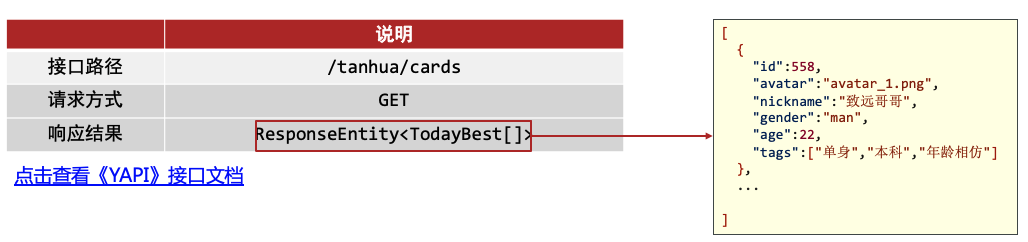
后台的业务如下
- 根据用户id,从UserLike表中查询出当前用户喜欢或者不喜欢的所有用户id
- 从Recommend User表中查询出所有的推荐给当前用户的用户id,然后排出第一步查出来的用户id,得到最终的推荐的用户id集合
- 根据id集合,查询用户的详细信息,封装VO返回
需要注意的是,如果登陆用户没有任何推荐的好友,拿我们就随机构建一些好友。
#默认推荐列表
tanhua:
  default:
    recommend:
      users: 2,3,8,10,18,20,24,29,27,32,36,37,56,64,75,88
下面是代码实现:
/**
 * 显示左右滑动卡片信息
 * @return
 */
@GetMapping("/cards")
public ResponseEntity getCards() {
    // 1. 调用service方法
    List<TodayBest> list = this.tanhuaService.getCards();
    return ResponseEntity.ok(list);
}
/**
 * 获取左滑右滑数据
 *
 * @return
 */
public List<TodayBest> getCards() {
    Long userId = UserHolder.getUserId();
    // 1. 调用API 查询到所有符合要求的RecommendUser集合
    List<RecommendUser> recommendUserList = this.recommendUserApi.getCards(userId, 10);
    // 2. 根据集合,查询出所有的用户详情
    List<Long> ids = CollUtil.getFieldValues(recommendUserList, "userId", Long.class);
    Map<Long, UserInfo> map = this.userInfoApi.getUserInfoByIds(ids, null);
    // 3. 封装VO
    List<TodayBest> list = new ArrayList<>();
    for (RecommendUser recommendUser : recommendUserList) {
        Long id = recommendUser.getUserId();
        UserInfo userInfo = map.get(id);
        if (userInfo != null) {
            list.add(TodayBest.init(userInfo, recommendUser));
        }
    }
    return list;
}
@Override
public List<RecommendUser> getCards(Long userId, int count) {
    // 1. 先到like表中查询当前用户已经喜欢或不喜欢的用户id
    Query query = new Query(Criteria.where("userId").is(userId));
    List<UserLike> userLikes = this.mongoTemplate.find(query, UserLike.class);
    List<Long> likedIds = CollUtil.getFieldValues(userLikes, "likeUserId", Long.class);

    // 2. 构造条件
    Criteria criteria = Criteria.where("toUserId").is(userId).and("userId").nin(likedIds);

    TypedAggregation<RecommendUser> aggregation = TypedAggregation.newAggregation(
      RecommendUser.class,
      Aggregation.match(criteria),
            Aggregation.sample(count)
    );

    return this.mongoTemplate.aggregate(aggregation, RecommendUser.class).getMappedResults();
}
1.3 左右滑动喜欢和不喜欢
和探探一样,用户可以通过左右滑动来喜欢或者不喜欢一个推荐的用户。其中喜欢的业务逻辑如下:
- 首先将喜欢的这个关系写入到UserLike表中。
- 将用户的喜欢信息保存到Redis中
- 判断用户是否是双向喜欢,如果是,需要将喜欢关系写入到好友表中,并注册到环信系统
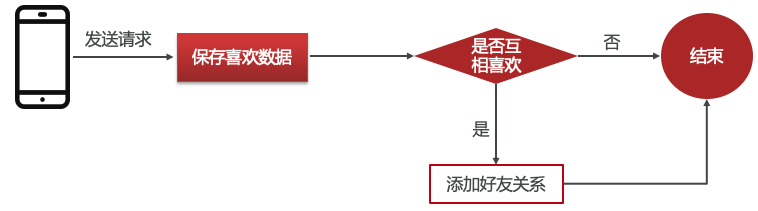
用户不喜欢的业务逻辑如下:
- 向UserLike表中写入不喜欢的数据
- 向Redis中写入不喜欢的数据

具体的代码如下:
/**
 * 用户左滑喜欢
 * @param userId
 * @return
 */
@GetMapping("/{id}/love")
public ResponseEntity loveUser(@PathVariable(name = "id") Long userId) {
    this.tanhuaService.loveUser(userId);
    return ResponseEntity.ok(null);
}

/**
 * 用户右滑不喜欢
 * @param userId
 * @return
 */
@GetMapping("/{id}/unlove")
public ResponseEntity unloveUser(@PathVariable(name = "id") Long userId) {
    this.tanhuaService.unloveUser(userId);
    return ResponseEntity.ok(null);
}
/**
 * 左滑喜欢
 *
 * @param likeUserId
 */
public void loveUser(Long likeUserId) {
    // 1. 将用户喜欢的信息保存到UserLike表
    boolean flag = this.userLikeApi.save(UserHolder.getUserId(), likeUserId, true);
    if (!flag) {
        throw new BusinessException(ErrorResult.error());
    }
    // 2. 将用户喜欢信息保存到Redis
    this.redisTemplate.opsForSet().add(Constants.USER_LIKE_KEY + UserHolder.getUserId(), likeUserId.toString());
    this.redisTemplate.opsForSet().remove(Constants.USER_NOT_LIKE_KEY + UserHolder.getUserId(), likeUserId.toString());
    // 3. 判断是否为双向喜欢
    boolean like = isLike(likeUserId, UserHolder.getUserId());
    if (like) {
        // 双向喜欢 添加好友
        this.messageService.contacts(likeUserId);
    }
}
public void unloveUser(Long likeUserId) {
    // 1. 将用户喜欢的信息保存到UserLike表
    boolean flag = this.userLikeApi.save(UserHolder.getUserId(), likeUserId, false);
    if (!flag) {
        throw new BusinessException(ErrorResult.error());
    }
    // 2. 将用户喜欢信息保存到Redis
    this.redisTemplate.opsForSet().remove(Constants.USER_LIKE_KEY + UserHolder.getUserId(), likeUserId.toString());
    this.redisTemplate.opsForSet().add(Constants.USER_NOT_LIKE_KEY + UserHolder.getUserId(), likeUserId.toString());
}
@Override
public boolean save(Long userId, Long likeUserId, boolean isLike) {
    Query query = new Query(
            Criteria.where("userId").is(userId)
                    .and("likeUserId").is(likeUserId)
    );
    UserLike userLike = this.mongoTemplate.findOne(query, UserLike.class);
    try {
        if (userLike == null) {
            // 不存在
            userLike = new UserLike();
            userLike.setUserId(userId);
            userLike.setLikeUserId(likeUserId);
            userLike.setIsLike(isLike);
            userLike.setCreated(System.currentTimeMillis());
            userLike.setUpdated(System.currentTimeMillis());
            this.mongoTemplate.save(userLike);
        } else {
            // 存在
            Update update = new Update();
            update.set("isLike", isLike);
            update.set("updated", System.currentTimeMillis());
            this.mongoTemplate.updateFirst(query, update, UserLike.class);
        }
        return true;
    } catch (Exception e) {
        return false;
    }
}
到此为止,探花功能已经完成
2. MongoDB的地理位置检索
随着互联网5G网络的发展, 定位技术越来越精确,地理位置的服务(Location Based Services,LBS)已经渗透到各个软件应用中。如网约车平台,外卖,社交软件,物流等。
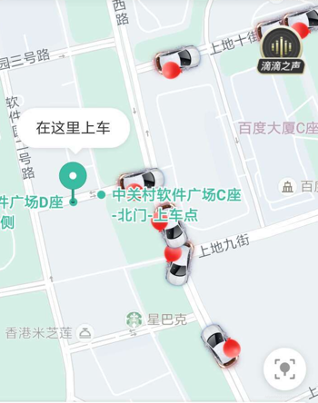
基于LBS的服务的实现方式如下:
- 前端页面上主要是根据位置显示在地图上,并且还可以获取到当前的位置,这一个功能可以通过百度或者高得的API来实现
- 后端主要是实现位置信息的存储,以及基于位置信息的搜索功能。
实现位置信息的存储和检索的方式有很多,比如ES,Redis,MongoDB,同时在新版本的MySQL中也已经支持了位置信息的存储和检索功能。本项目采用MongoDB。
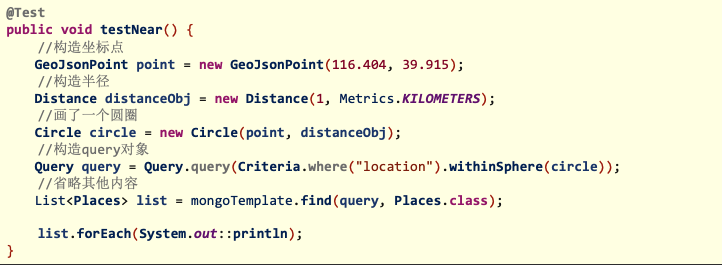
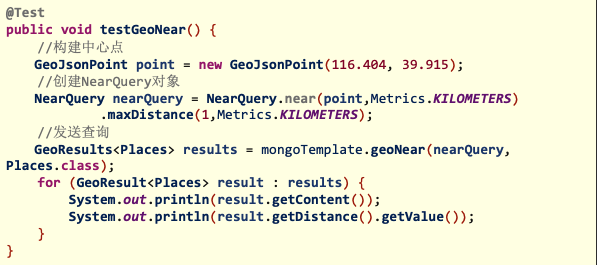
下面是MongoDB地理位置检索的实例代码:
搜索附近已某坐标点为圆心,查找半径范围内所有数据
搜索附近并返回距离
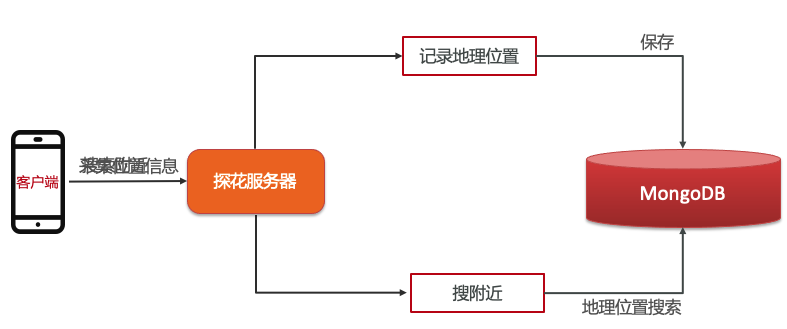
在我们的项目中的搜索附近的人的功能用到了地理位置信息服务,我们项目中的业务主要分为两部分。
- 首先第一部分是地理位置信息的上报,客户端每隔一定的时间向服务器发送一些当前的地理位置坐标。这些地理位置信息被保存到MongoDB中的userLocation表中。
- 第二部分是根据地理位置查找附近的用户。
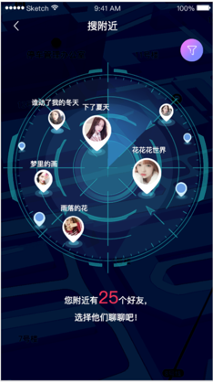
2.1 上报地理位置信息
首先第一部分是地理位置信息的上报,客户端每隔一定的时间向服务器发送一些当前的地理位置坐标。这些地理位置信息被保存到MongoDB中的userLocation表中。
需要注意的是:在我们保存用户位置信息到userLocation表的时候,需要判断一些记录是否已经存在,如果存在了则更新原有记录。
代码如下:
@Data
@NoArgsConstructor
@AllArgsConstructor
@Document(collection = "user_location")
@CompoundIndex(name = "location_index", def = "{'location': '2dsphere'}")
public class UserLocation implements java.io.Serializable{

    private static final long serialVersionUID = 4508868382007529970L;

    @Id
    private ObjectId id;
    @Indexed
    private Long userId; //用户id
    private GeoJsonPoint location; //x:经度 y:纬度
    private String address; //位置描述
    private Long created; //创建时间
    private Long updated; //更新时间
    private Long lastUpdated; //上次更新时间
}
/**
 * 上报地理位置信息
 * @param map
 * @return
 */
@PostMapping("/location")
public ResponseEntity uploadLocation(@RequestBody Map map) {
    double latitude = Double.parseDouble(map.get("latitude").toString());
    double longitude = Double.parseDouble(map.get("longitude").toString());
    String addrStr = map.get("addrStr").toString();
    this.baiduService.uploadLocation(latitude, longitude, addrStr);
    return ResponseEntity.ok(null);
}
public void uploadLocation(double latitude, double longitude, String addrStr) {
    Long userId = UserHolder.getUserId();
    boolean flag = this.userLocationApi.saveOrUpdate(userId, latitude, longitude, addrStr);
    if (!flag) {
        throw new BusinessException(ErrorResult.error());
    }
}
@Override
public boolean saveOrUpdate(Long userId, double latitude, double longitude, String addrStr) {
    // 构建条件
    Query query = new Query(Criteria.where("userId").is(userId));
    // 如果存在则更新,否则新增
    UserLocation location = this.mongoTemplate.findOne(query, UserLocation.class);
    try {
        if (location == null) {
            location = new UserLocation();
            location.setUserId(userId);
            location.setLocation(new GeoJsonPoint(longitude, latitude));
            Long time = System.currentTimeMillis();
            location.setUpdated(time);
            location.setCreated(time);
            location.setLastUpdated(time);
            location.setAddress(addrStr);
            this.mongoTemplate.save(location);
        } else {
            Update update = new Update();
            update.set("location", new GeoJsonPoint(longitude, latitude));
            update.set("updated", System.currentTimeMillis());
            update.set("LastUpdated", location.getUpdated());
            this.mongoTemplate.updateFirst(query, update, UserLocation.class);
        }
        return true;
    } catch (Exception e) {
        return false;
    }
}
2.2 搜索附近的人
将用户的位置信息保存到数据库后,便可以搜索附近的人了。用户在前端页面可以设置查询的条件以及距离要求,后台将所有查询到的用户返回。具体的业务逻辑如下
- 首先先查询当前用户的位置,然后根据当前用户的位置坐标,到userLocation表中按照指定的距离查询出所有符合条件的用户id
- 根据用户id和相应的查询条件,查询出所有的符合要求的用户详情。
- 最后封装VO对象。
- 需要注意的是,在查询附近的人的时候,也会把当前用户自己查出来,在封装VO对象的时候应该将当前用户排出在外。
相关代码如下
//附近的人vo对象
@Data
@NoArgsConstructor
@AllArgsConstructor
public class NearUserVo {

    private Long userId;
    private String avatar;
    private String nickname;

    public static NearUserVo init(UserInfo userInfo) {
        NearUserVo vo = new NearUserVo();
        vo.setUserId(userInfo.getId());
        vo.setAvatar(userInfo.getAvatar());
        vo.setNickname(userInfo.getNickname());
        return vo;
    }
}
/**
 * 附近的人
 * @param gender
 * @param distance
 * @return
 */
@GetMapping("/search")
public ResponseEntity getNearPeople(String gender, String distance) {
    List<NearUserVo> voList = this.tanhuaService.getNearPeople(gender, distance);
    return ResponseEntity.ok(voList);
}
public List<NearUserVo> getNearPeople(String gender, String distance) {
    // 1. 获取到附近人的用户id
    Long userId = UserHolder.getUserId();
    List<Long> ids = this.userLocationApi.getNearPeople(userId, distance);
    // 2. 根据用户id查询用户详情
    UserInfo condition = new UserInfo();
    condition.setGender(gender);
    Map<Long, UserInfo> map = this.userInfoApi.getUserInfoByIds(ids, condition);
    // 3. 封装VO 注意排除当前用户
    List<NearUserVo> voList = new ArrayList<>();
    for (Long id : ids) {
        if (Objects.equals(id, userId)) {
            // 用户自己
            continue;
        }
        UserInfo userInfo = map.get(id);
        if (userInfo != null) {
            voList.add(NearUserVo.init(userInfo));
        }
    }
    return voList;
}
@Override
public List<Long> getNearPeople(Long userId, String distance) {
    // 1. 根据用户id,查询到登录用户的位置
    Query query = new Query(Criteria.where("userId").is(userId));
    UserLocation userLocation = this.mongoTemplate.findOne(query, UserLocation.class);
    if (userLocation.getLocation() == null) {
        return new ArrayList<>();
    }
    // 2. 查询附近的人
    GeoJsonPoint point = userLocation.getLocation(); // 圆心
    Distance dis = new Distance(Integer.parseInt(distance) / 1000, Metrics.KILOMETERS); // 半径
    Circle circle = new Circle(point, dis);
    Query nearQuery = new Query(Criteria.where("location").withinSphere(circle));
    List<UserLocation> userLocations = this.mongoTemplate.find(nearQuery, UserLocation.class);

    // 3. 提取出ids返回
    return CollUtil.getFieldValues(userLocations, "userId", Long.class);
}

网易智企-云信开发者社区是面向全网开发者的技术交流与服务平台,依托近 29 年 IM、音视频技术积累,提供 IM、RTC、实时对话智能体、云原生、短信等全场景开发资源。
更多推荐


 0
0 0
0- 0


 已为社区贡献3条内容

所有评论(0)